iPhone app · No account · No ads
Dinner Ideas
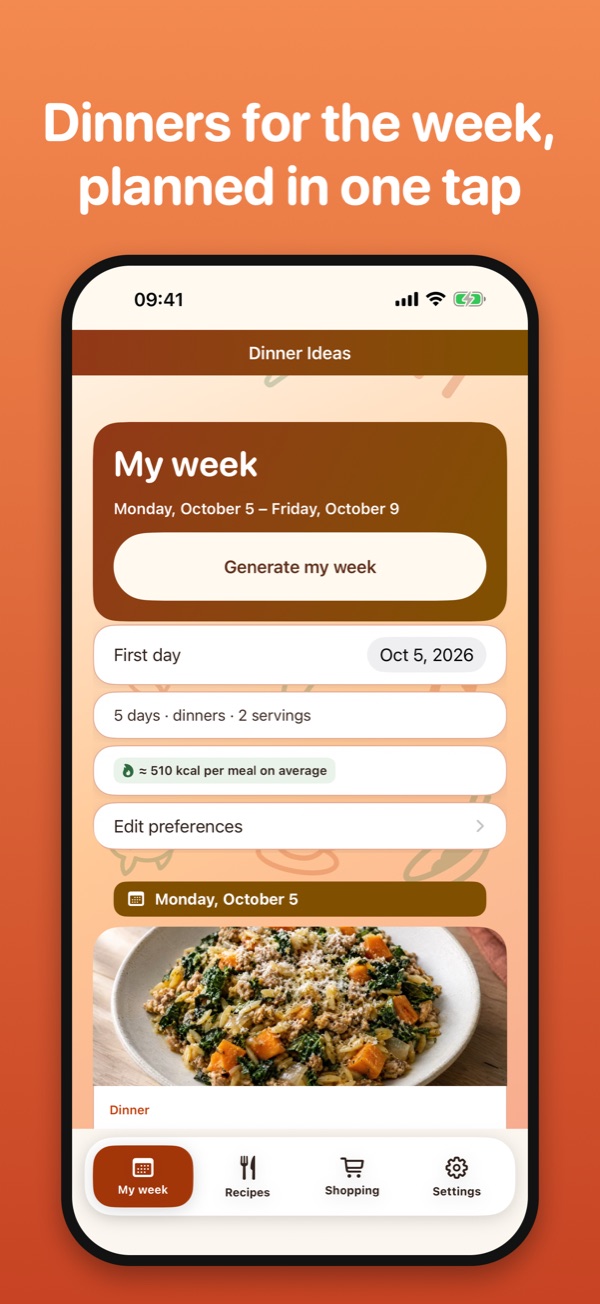
What’s for dinner this week? One tap plans 5 or 7 easy dinners and builds the grocery list that goes with them, sorted by aisle.
Download on the App Store No ads, no tracking. Everything stays on your iPhone and works offline.Dinner, sorted for the week
- A week of dinners in one tapGet 5 or 7 dinners with no repeats. Lock the ones you like, reshuffle the rest, or replace a single meal.
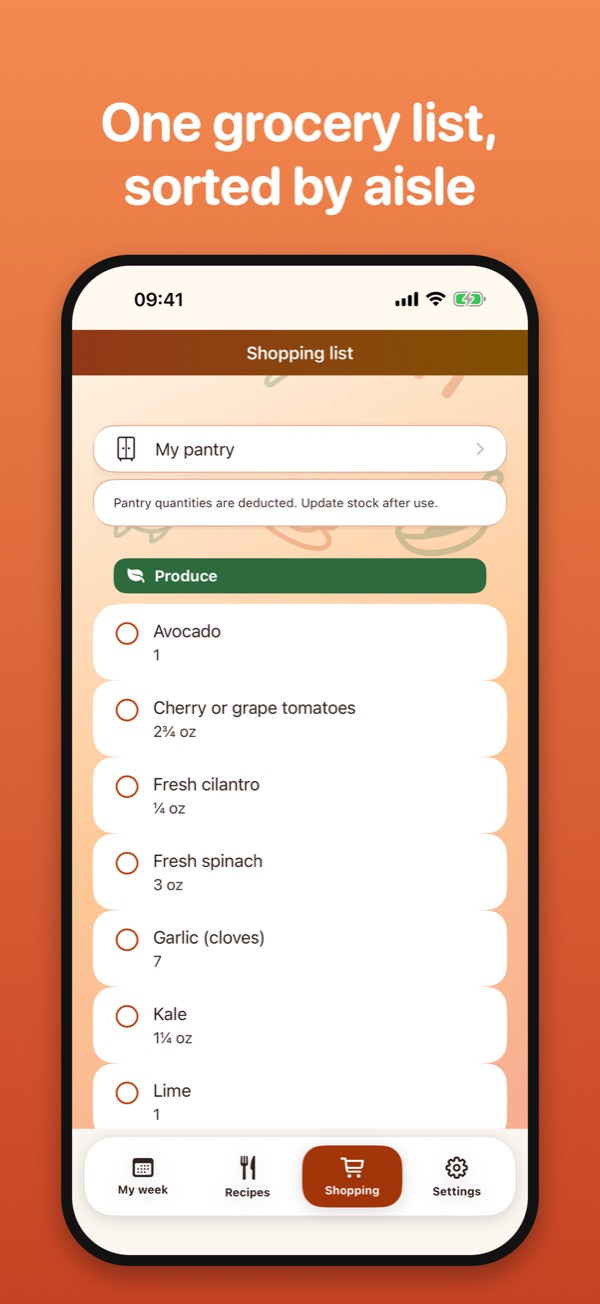
- One grocery list, sorted by aisleQuantities are added up for your servings and rounded to whole items. Deduct what is already in your pantry.
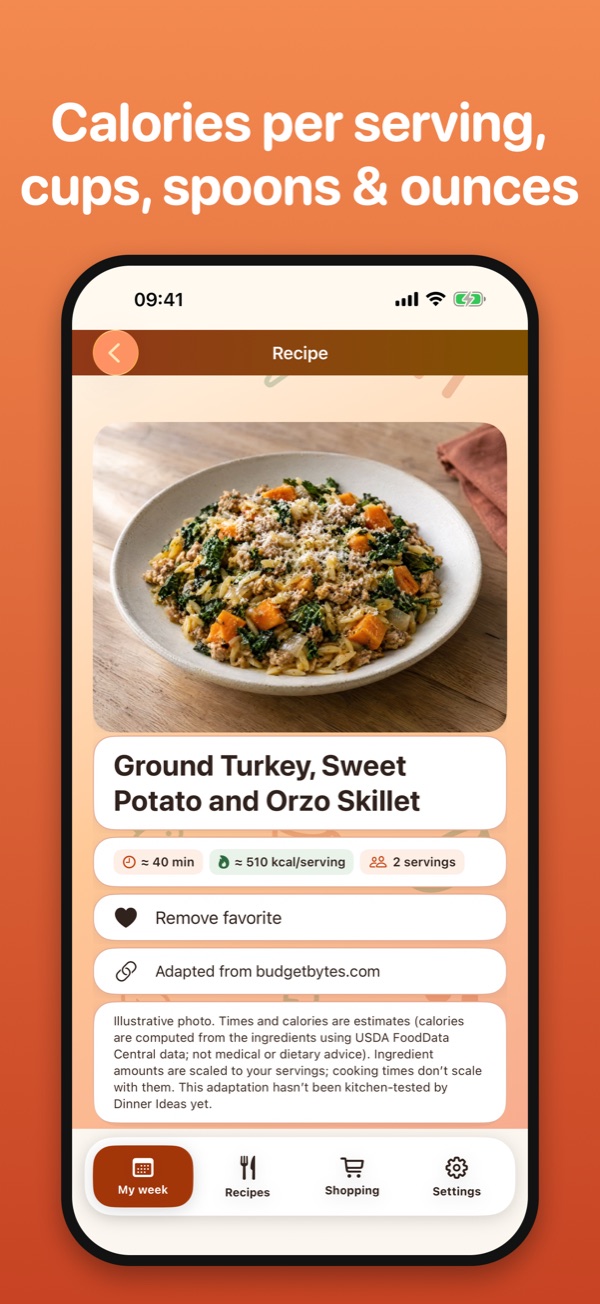
- 500 recipes in 8 collections (version 2.0)Classics, French, Chinese, Korean, Caribbean (Martinique and Guadeloupe), African, easy 20-minute meals, and light, protein-rich dinners. Every recipe shows estimated calories, protein, fat and carbs per serving. Earlier versions include the 150 classics.
- Your filters, respectedServings, a time limit, vegetarian or vegan, excluded ingredients and allergens. The app never quietly loosens them.
- 10 languages, metric or US units (version 2.0)English, French, Spanish, German, Italian, Portuguese (Brazil), Dutch, Japanese, Korean and Traditional Chinese.
- Dinner Ideas Premium (version 2.0)An auto-renewable subscription, yearly with a free trial or monthly, unlocks generating and changing weeks, every recipe, advanced filters and the pantry. Without it you can browse the recipe collections and keep reading your saved week and shopping list.
Privacy Policy
Effective October 9, 2026 · applies to Dinner Ideas (formerly CookCart and Weekbite) for iPhone, version 1.0 and later
What stays on your iPhone
Your meal plan, preferences (number of days, servings, time limit, diet, excluded ingredients and allergens), pantry quantities, favorites and checked shopping items are saved in a file inside the app on your device. They never leave it unless you choose to.
When data leaves your device — only because you asked
- Share / Export: when you share your plan or shopping list, or export a backup, iOS sends the content to the app or place you pick. What happens next is governed by that app.
- iCloud / device backups: like other app data, the file may be included in your iPhone's backups under your Apple account settings.
- Recipe source links: tapping "Adapted from…" opens the original website in Safari; that site's own privacy policy applies.
Purchases and subscriptions (version 2.0 and later)
Dinner Ideas Premium is bought through Apple’s App Store. Apple processes the payment and manages the subscription under its own privacy policy. We never receive your name, your Apple Account or your payment details. The app only asks Apple’s purchase system on your iPhone whether a subscription is active.
Network
The recipe catalog is built into the app, and the app sends nothing to us. From version 2.0, it contacts the App Store only to show the subscription offers and to check or restore a purchase.
Children
Dinner Ideas is suitable for all ages and collects no information from anyone, including children.
Health information
Diet and allergen filters are a convenience based on ingredient labels in our catalog. They are not medical advice; always check product packaging for allergens and cross-contamination.
Deleting your data
Data stays on your iPhone until you replace it or delete the app. Settings › Reset clears the active data (plan, preferences, favorites, pantry and shopping checks) but keeps a local recovery copy on the device; delete the app (rather than offloading it) to remove everything. Exported backup files are yours to delete separately, and they are not encrypted by Dinner Ideas. Because we hold nothing on any server, there is nothing to request from us.
Changes and contact
If this policy changes, the new version will be posted on this page with a new effective date. Questions: see the contact address below.
Terms of Use
Effective October 9, 2026
Dinner Ideas is licensed under Apple’s standard Licensed Application End User License Agreement.
Dinner Ideas Premium
- Premium is an auto-renewable subscription, offered yearly (with a free trial for new subscribers, when available) or monthly. Prices are shown in the app before you buy and depend on your country.
- Payment is charged to your Apple Account when you confirm the purchase. The subscription renews automatically unless it is cancelled at least 24 hours before the end of the current period.
- You can manage or cancel your subscription at any time in your App Store account settings. Deleting the app does not cancel a subscription.
Recipes and nutrition
Recipes are adapted from published sources credited in the app. Cooking times, calories and macronutrients are estimates computed from the ingredients; they are not medical or dietary advice. Recipe pictures are illustrations. Always check packaging for allergens.
Support
We read every message and usually answer within a few days.
balustreyonni@gmail.com
- "Not enough compatible recipes" — why?
- Your filters (time limit, diet, excluded ingredients or allergens) leave fewer recipes than meals in your week. Dinner Ideas never loosens your filters on its own: raise the time limit, choose 5 days instead of 7, or remove an exclusion. Fully vegan weeks work best with a 60-minute limit.
- How do I keep a dinner and reshuffle the rest?
- Tap Lock on the meals you want to keep, then Generate my week. Use Replace to swap a single dinner.
- Why does the shopping list say 1 avocado when the recipe uses half?
- The list rounds whole items up so you buy what you need; recipe pages show exact amounts for your servings.
- Can I use metric units?
- From version 2.0, choose metric or US units in Settings, in any of the 10 languages. In earlier versions, metric units come with French and US units with English.
- How do I manage, cancel or restore my subscription?
- Manage or cancel it in the Settings app of your iPhone: tap your name, then Subscriptions. On a new device, open Dinner Ideas, go to Settings › Subscription and tap Restore purchases.
- What can I do without a subscription?
- You can browse the recipe collections and keep reading your saved week, its recipes and your shopping list. Generating or changing a week, opening other recipes, advanced filters and the pantry are part of Premium.
- Where do the recipes come from?
- Each recipe is adapted from a published recipe and credits its source; steps are rewritten for Dinner Ideas. Cooking times and nutrition values are estimates.
- How do I move my data to a new iPhone?
- Settings › Export creates a backup file; open it with Settings › Import on the new device.
En français
L’app : Dinner Ideas planifie vos dîners de la semaine en un geste (5 ou 7 jours) et prépare la liste de courses triée par rayon. Version 2.0 : 500 recettes en 8 rubriques (classiques, française, chinoise, coréenne, antillaise, africaine, repas de la flemme, léger et protéiné), calories et macronutriments estimés pour chaque recette, 10 langues, unités métriques ou américaines. Sans compte ni publicité.
Dinner Ideas Premium (version 2.0) : abonnement à renouvellement automatique, annuel avec essai gratuit ou mensuel. Il débloque la création et la modification des semaines, toutes les recettes, les filtres avancés et le placard. Sans abonnement, vous pouvez parcourir les rubriques et relire votre semaine et vos courses enregistrées. Le paiement est prélevé sur votre compte Apple à la confirmation de l’achat ; l’abonnement se renouvelle automatiquement, sauf résiliation au moins 24 heures avant la fin de la période en cours ; il se gère et se résilie dans les réglages de votre compte App Store. Les prix sont affichés dans l’app avant l’achat. Conditions d’utilisation : contrat de licence standard d’Apple.
Confidentialité : Dinner Ideas ne collecte, ne transmet et ne vend aucune donnée personnelle. Pas de compte, de publicité, d'analyse ni de traceur. Votre planning, vos préférences, votre placard et vos favoris restent dans un fichier de l'app sur votre iPhone ; ils n'en sortent que si vous les partagez ou les exportez vous-même (ou via les sauvegardes de votre appareil). Les achats sont traités par Apple : nous ne recevons ni votre nom, ni votre compte Apple, ni vos données de paiement. L'app ne nous envoie rien ; à partir de la version 2.0, elle contacte seulement l'App Store pour afficher les offres et vérifier ou restaurer un achat. Les filtres de régime et d'allergènes, les calories et les macronutriments sont indicatifs et ne constituent pas un avis médical.
Suppression : les données restent sur votre iPhone jusqu'à ce que vous les remplaciez ou que vous supprimiez l'app. Réglages › Réinitialiser efface les données actives, mais conserve une copie de récupération sur l'appareil ; supprimez l'app (plutôt que de la décharger) pour tout effacer. Les fichiers de sauvegarde exportés ne sont pas chiffrés par Dinner Ideas et se suppriment séparément.
Modifications : si cette politique change, la nouvelle version sera publiée sur cette page avec sa date d'effet. Version en vigueur : 9 octobre 2026.
Assistance : écrivez à l'adresse ci-dessus.